|
|
| |

24-bit/96kHz USB Mic Preamp
|
 |
|
MicPort Pro features a low noise, solid state Class
A preamp and a high fidelity A/D converter, which will capture
vocals and instruments at full 24-bit/96kHz resolution at
home, in a studio or live on stage, using any dynamic or condenser
microphone with an XLR connector. Here are some typical applications.
|
| |
|
ENG for Broadcast
With 24-bit/96kHz performance and no need for batteries,
broadcasters like BBC, CNN and CBS cameramen and reporters
use MicPort Pro to record broadcast quality news in
the field and in their hotel rooms at night.
|
| |
|
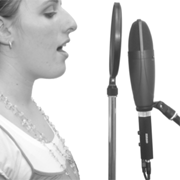
Recording Vocals
Vocals sell the song. Place your best microphone in front
of the vocalist to capture the subtle details of the perfromance.
Plug your MicPort Pro right into the microphone and
don't forget to engage phantom power if you are using a condenser.
Attach the supplied USB cable to a Mac or PC and you are ready
to record.
Bonus: Plug the headphones into the headphone jack
and give your vocalist the abitlity to hear herselft in real
time, without delay. Mic gain and headphone volume adjustment
knobs are located right on the unit. Adjust gain for maximum
signal level without distortion. Adjust headphone level to
taste.
|
| |
|
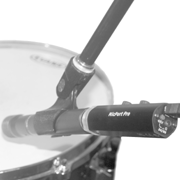
Sampling
DJs often get their samples off records, but the best way
to get that perfect snare or tom sound is to sample the drum
itself. Use a condenser microphone for best results. MicPort
Pro makes it easy to create high quality samples due to
its conveniently located microphone gain control knob and
wide range of gain adjustment. Experiement with mic placement
to get the right sound from the drum.
|
| |
|
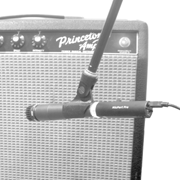
Recording Instruments
For a guitar player, the amp is an integral part of the sound.
It takes a long time to dial the amp just right, so it makes
sense to record the sound of the amp when you are recording
guitar parts. MicPort Pro allows you to do just that.
Set up a dynamic mic on a stand, pointing the mic at the the
speaker, plug the MicPort Pro into the back of the
mic amp and you are ready to record. Experiement with mic
placement to get the right sound from the amp.
Bonus: If your guitar, bass or keyboard amp has an
XLR output, you can plug the MicPort Pro right in.
No microphone is needed in this case.
|
| |
|
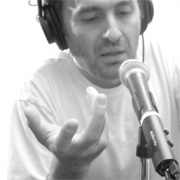
Podcasting and Spoken Word
MicPort Pro is the perfect solution for Podcasting.
Its small size, built-in headphone amp, on-board 48V phantom
power and easy gain and headphone level adjustments make it
the most portable, professional podcasting solution. Need
to do a remote feed? Put a MicPort in your pocket and
travel light for a change. What a concept!
|
| |
|
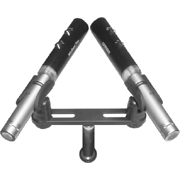
Stereo and Multichannel Recording
For years, CEntrance has been is in the business of making
audio products work together. MicPort Pro is no exception.
Need a stereo recording? Use two MicPorts. Need more channels?
Just add more units. The CEntrance Universal
Driver for Windows (XP and Vista) will take care of the
rest. It's a free download for MicPort users. No driver is
needed for Mac OS X 10.4 and above.
|
| |
|
For additional tips and tricks on using the MicPort Pro,
please visit our forum www.centrance.com/forum
|